Software Heritage Archive 是一个代码档案库,可以下载已被删除的 GitHub、GitLab 等平台的代码。
参考:https://til.simonwillison.net/github/software-archive-recovery
Stuff I learned recently.
Software Heritage Archive 是一个代码档案库,可以下载已被删除的 GitHub、GitLab 等平台的代码。
参考:https://til.simonwillison.net/github/software-archive-recovery
Unleash 是一个企业级的 Feature Toggle 管理平台,核心价值是解耦部署与发布。
Unleash 采用本地求值架构:
今天学到了可以在对应的 pr 中添加 .diff 直接查看 diff, 然后可以将链接直接丢给在线的 ai 大模型给你 review
比如 https://github.com/zhaochunqi/git-open/pull/24 可以使用 https://github.com/zhaochunqi/git-open/pull/24.diff, 然后提交给大模型说:review https://github.com/zhaochunqi/git-open/pull/24.diff 即可,我看了下纯文本,感觉复制粘贴都行。
traefik 中生成的证书如果已经不再使用 (表现其实就是过期了) 的证书,经查询发现有人写了相关的脚本来处理,稍作修改直接使用 uv 来管理避免需要手动安装依赖。
uv run - <<EOF
# /// script
# requires-python = ">=3.12"
# dependencies = [
#     "cryptography",
# ]
# ///
import json
import sys
import base64
from datetime import datetime, timedelta, timezone
from cryptography import x509
import os

DEBUG = os.environ.get("DEBUG", False)


def cleanup_certs(acme_file="acme.json"):
    """
    Deletes all expired certificates from acme.json.
    """
    try:
        with open(acme_file, "r") as f:
            data = json.load(f)
    except FileNotFoundError:
        print(f"Error: {acme_file} not found.")
        return

    now = datetime.now()
    if DEBUG:
        print(f"DEBUG: current time: {now}")

    cleaned_count = 0

    def process_certificates(certificates, version):
        nonlocal cleaned_count
        if not certificates:
            return [], 0

        original_cert_count = len(certificates)
        certs_to_keep = []
        removed_certs = []
        for cert in certificates:
            cert_b64 = ""
            domain = "N/A"
            try:
                if version == 1:
                    cert_b64 = cert.get("Certificate", "")
                    domain = cert.get("Domain", {}).get("Main", "N/A")
                elif version in [2, 3]:
                    cert_b64 = cert.get("certificate", "")
                    domain = cert.get("domain", {}).get("main", "N/A")

                if cert_b64:
                    cert_b64_decoded = cert_b64.replace("-", "+").replace("_", "/")
                    padding_needed = len(cert_b64_decoded) % 4
                    if padding_needed != 0:
                        cert_b64_decoded += "=" * (4 - padding_needed)

                    cert_pem_bytes = base64.b64decode(cert_b64_decoded)
                    x509_cert = x509.load_pem_x509_certificate(cert_pem_bytes)
                    not_after_date = x509_cert.not_valid_after_utc

                    if DEBUG:
                        print(
                            f"DEBUG: Processing domain {domain}, not_valid_after: {not_after_date}"
                        )

                    if not_after_date > datetime.now(timezone.utc):
                        certs_to_keep.append(cert)
                    else:
                        removed_certs.append(domain)
                else:
                    certs_to_keep.append(cert)
            except Exception as e:
                print(f"Could not process certificate for domain {domain}: {e}")
                certs_to_keep.append(cert)

        removed_count = original_cert_count - len(certs_to_keep)

        # We only want to add to the cleaned_count if we are in a v2/v3 file,
        # because the v1 file has only one list of certs and we will get the
        # count from the return value of this function.
        if version in [2, 3]:
            cleaned_count += removed_count

        for domain_name in removed_certs:
            print(f"Removed certificate for: {domain_name}")

        return certs_to_keep, removed_count

    # Detect acme.json version
    version = None
    if (
        isinstance(data, dict)
        and "Certificates" in data
        and isinstance(data.get("Certificates"), list)
    ):
        version = 1
    elif isinstance(data, dict):
        for key, value in data.items():
            if isinstance(value, dict) and "Certificates" in value:
                version = 2  # Treat as v2/v3 generic
                break

    if DEBUG:
        print(f"DEBUG: Detected version: {version}")

    if version == 1:
        certs_to_keep, removed_count = process_certificates(
            data["Certificates"], version
        )
        if removed_count > 0:
            data["Certificates"] = certs_to_keep
            cleaned_count = removed_count
    elif version == 2:
        for resolver, resolver_data in data.items():
            if (
                isinstance(resolver_data, dict)
                and "Certificates" in resolver_data
                and resolver_data["Certificates"] is not None
            ):
                if DEBUG:
                    print(f"DEBUG: Processing resolver: '{resolver}'")
                certs_to_keep, _ = process_certificates(
                    resolver_data["Certificates"], version
                )
                resolver_data["Certificates"] = certs_to_keep
            else:
                if DEBUG:
                    print(f"DEBUG: Resolver '{resolver}': No certificates to process.")

    else:
        print("Could not determine the structure of the acme.json file.")
        return

    if cleaned_count == 0:
        print("No expired certificates to remove.")
    else:
        try:
            with open(acme_file, "w") as f:
                json.dump(data, f, indent=4)
            print(
                f"Successfully cleaned up {cleaned_count} certificates in {acme_file}."
            )
        except Exception as e:
            print(f"Error writing to {acme_file}: {e}")


if __name__ == "__main__":
    help_message = """
Usage: python3 cleanup_certs.py [--help] [acme_file]

Deletes all expired certificates from an acme.json file.
The script attempts to auto-detect the acme.json file version (v1 or v2/v3).

Arguments:
  acme_file   Optional. Path to the acme.json file. Defaults to "acme.json".
  --help      Display this help message and exit.
"""

    if "--help" in sys.argv:
        print(help_message)
        sys.exit(0)

    if len(sys.argv) > 1 and sys.argv[1] != "--help":
        file_path = sys.argv[1]
    else:
        file_path = "acme.json"

    cleanup_certs(file_path)
EOF根据 POSIX 标准:文本行必须以换行符结尾。这意味着 rbw get xxx 的时候,实际上屏幕输出的是带有空格的。但是为什么 export a = $(rbw get xxx) 不会存在问题呢?因为 ${} (命令替换|Command Substitution) 会去掉尾部的换行。
参考链接:
使用 raycast 可以直接对接类似 google 之类的搜索,这次用来搜索 TIL. 添加 quicklink 链接 https://til.zhaochunqi.com/search/?compact=true&q={Query} 即可在默认浏览器中搜索我的 TIL.
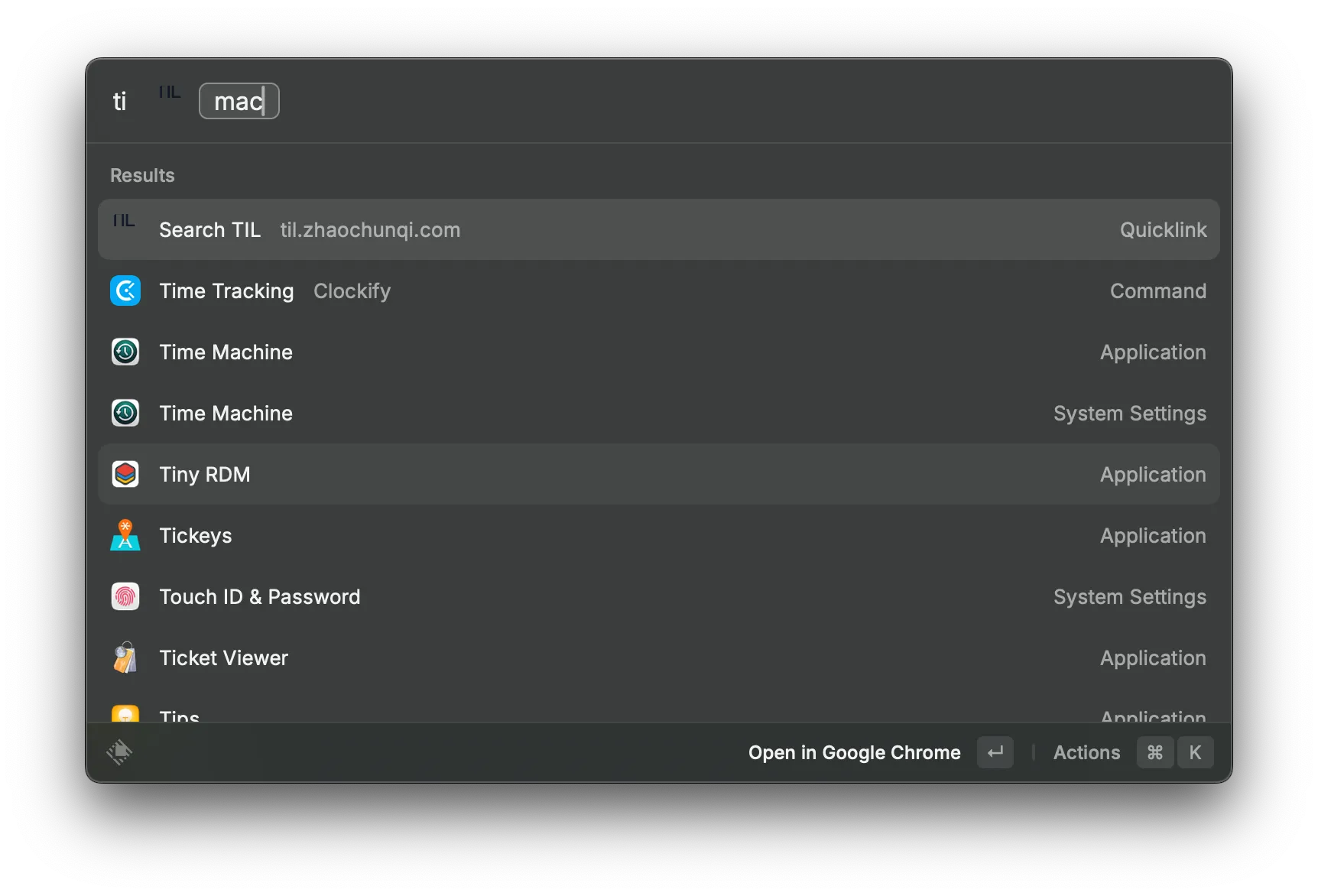
开发的时候遇到右侧由于有些页面有滚动条,有些没有导致同一个布局会出现布局偏移。
添加 scrollbar-gutter: stable; 就可以避免此问题。
参考链接:https://developer.mozilla.org/en-US/docs/Web/CSS/Reference/Properties/scrollbar-gutter
xcrun simctl status_bar booted override \
    --time "9:41" \
    --dataNetwork "wifi" --wifiMode active --wifiBars 3 \
    --cellularMode active --cellularBars 4 \
    --batteryState charged --batteryLevel 100
参考链接:https://jocmp.com/2025/08/08/demo-mode-for-ios-simulators/
在 x 上看到由于 macos 的一个安全检测机制显著降低了构建速度,可以通过添加到 Developer Tools 解决。
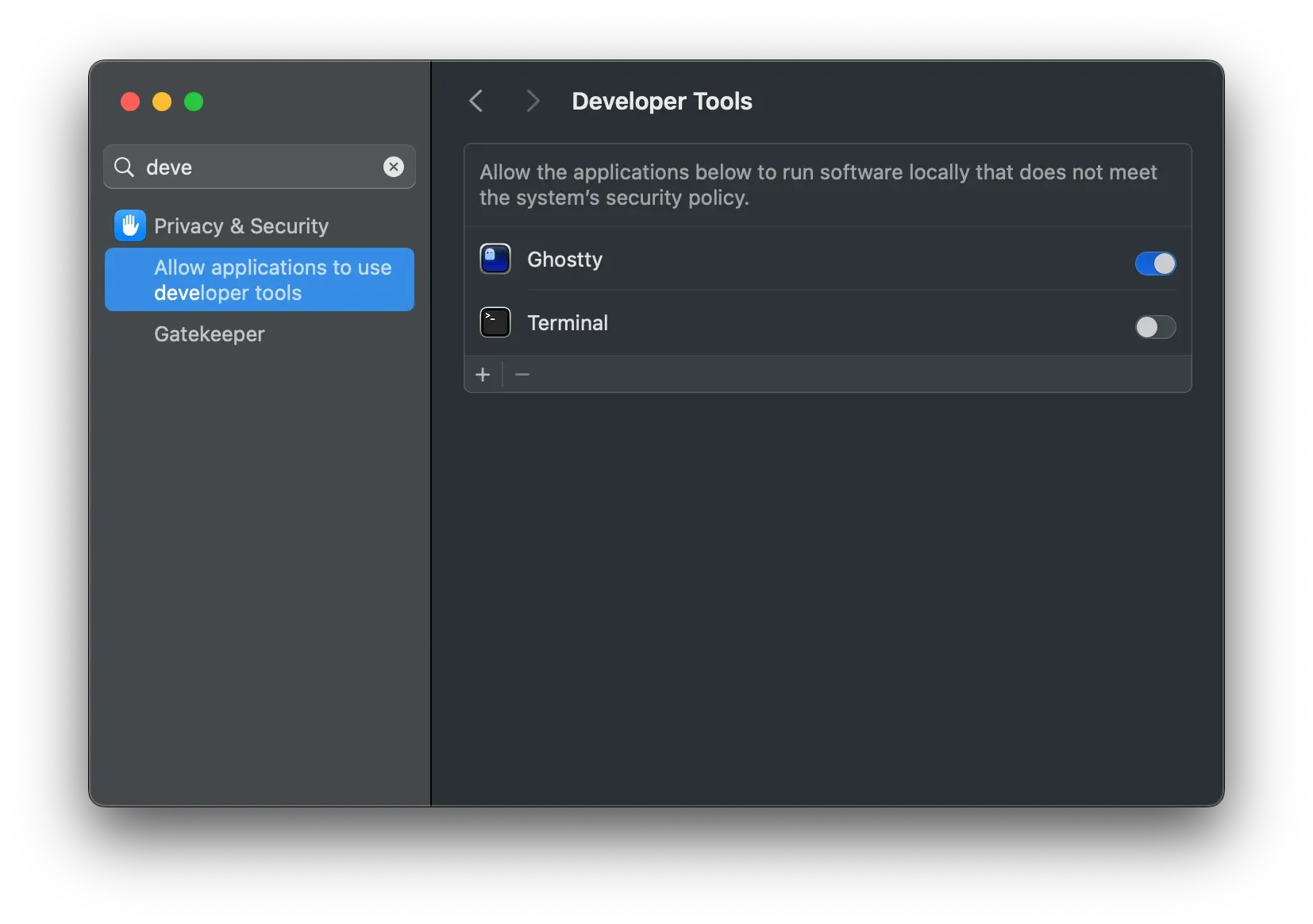
当你打开网络下载的 App 遇到提示 “应用已损坏,打不开” 或 “无法验证开发者” 时,通常是因为 macOS 的 Gatekeeper 安全机制拦截了该应用。
打开终端,执行以下命令即可修复:
# 语法:xattr -cr /Applications/你的应用名称.app
xattr -cr /Applications/jmcomic-downloader.app
提示:输入
xattr -cr后加一个空格,然后直接把 App 从“应用程序”文件夹拖入终端,路径会自动生成。
macOS 使用 扩展文件属性 (Extended File Attributes) 来标记文件的来源和元数据。
com.apple.quarantine):
当你使用浏览器(如 Chrome, Safari)下载文件时,macOS 会自动给文件加上一个名为 com.apple.quarantine (隔离) 的扩展属性。Gatekeeper 会检查这个属性,如果没有有效的开发者签名,系统就会拒绝运行并提示“已损坏”。xattr):xattr:管理文件扩展属性的工具。-c (Clear):清除所有扩展属性(包括隔离标记)。-r (Recursive):递归处理,应用到 .app 包内的所有文件。如果你只想移除隔离属性,而不影响其他元数据(如 Finder 的颜色标签等),可以使用更精准的 -d (Delete) 参数:
# 仅移除 quarantine 属性,保留其他属性
xattr -rd com.apple.quarantine /Applications/jmcomic-downloader.app
Antigravity很多人都遇到了即便正常登录了会提示说不满足使用 Antigravity 的权限,这种情况很大可能是你被判定在不属于服务范围内的地区了。
提交申诉链接:https://policies.google.com/country-association-form 到支持的国家等待通过即可。
kill 掉运行在 8000 端口的应用
lsof -ti :8000 | xargs kill -9google 创建 app password 在新账户中没有入口,可以通过链接:https://myaccount.google.com/apppasswords 进入。创建之后就可以在 2-Step-Verification 中下面看见入口了。
参考链接:https://support.google.com/accounts/answer/185833?sjid=7089753784765104901-NA
TL,DR: 在环境中添加 export RBW_TTY=$(tty) 即可解决
在 macos 下使用 rbw 来获取密钥时,经常会遇到需要至少 10s 以上的情况,但是在 linux 下并没有此现象,经过一番研究发现是 macos 系统机制问题导致的:rbw 在系统中会调用 ttyname(), 这个机制在 linux 下和 macos 下不同,在 linux 下只需要读取 /proc/self/fd/0 即可,但是在 macos 下,需要遍历,这可能要调用 /dev 目录下数百个设备文件。rbw 提供了一个机制,可以通过设定 RBW_TTY 这个环境变量跳过此检测。
kitty 默认不支持 Fcitx 的输入,但是在 fctix5 下可以通过使用命令 GLFW_IM_MODULE=ibus kitty 启用的 kitty 来输入中文。
链接:https://github.com/kovidgoyal/kitty/issues/5549#issuecomment-1264867941
一直不太明白为什么会有 “月背” 这个概念,心里想着:难道月亮会有一面一直在背面?
查了下,确实是这样,由于 潮汐锁定 的原因,月亮公转和自转的周期是一致的,在地球看来,其实就是一直一个面对着。但是这不代表背面没有阳光,只是相对于地球而已。
这个是用于 Nano Banana 的 prompt. 来源 linuxdo
{
  "task": "portrait_restoration",
  "language": "zh-CN",
  "prompt": {
    "subject": {
      "type": "human_portrait",
      "identity_fidelity": "match_uploaded_face_100_percent",
      "no_facial_modification": true,
      "expression": "natural",
      "eye_detail": "sharp_clear",
      "skin_texture": "ultra_realistic",
      "hair_detail": "natural_individual_strands",
      "fabric_detail": "rich_high_frequency_detail"
    },
    "lighting": {
      "exposure": "bright_clear",
      "style": "soft_studio_light",
      "brightness_balance": "even",
      "specular_highlights": "natural_on_face_and_eyes",
      "shadow_transition": "smooth_gradual"
    },
    "image_quality": {
      "resolution": "8k",
      "clarity": "high",
      "noise": "clean_low",
      "artifacts": "none",
      "over_smoothing": "none"
    },
    "optics": {
      "camera_style": "full_frame_dslr",
      "lens": "85mm",
      "aperture": "f/1.8",
      "depth_of_field": "soft_shallow",
      "bokeh": "smooth_natural"
    },
    "background": {
      "style": "clean_elegant",
      "distraction_free": true,
      "tone": "neutral"
    },
    "color_grading": {
      "style": "cinematic",
      "saturation": "rich_but_natural",
      "white_balance": "accurate",
      "skin_tone": "natural_true_to_subject"
    },
    "style_constraints": {
      "no_cartoon": true,
      "no_beauty_filter": true,
      "no_plastic_skin": true,
      "no_face_reshaping": true,
      "no_ai_face_swap": true
    }
  },
  "negative_prompt": [
    "cartoon",
    "anime",
    "cgi",
    "painterly",
    "plastic skin",
    "over-smoothing",
    "over-sharpening halos",
    "heavy skin retouching",
    "face reshaping",
    "identity drift",
    "face swap",
    "beauty filter",
    "uncanny",
    "washed out",
    "color cast",
    "blown highlights",
    "crushed shadows",
    "banding",
    "jpeg artifacts",
    "extra fingers",
    "deformed eyes",
    "asymmetrical face",
    "warped features"
  ],
  "parameters": {
    "fidelity_priority": "identity",
    "detail_priority": "eyes_skin_hair_fabric",
    "realism_strength": 0.95,
    "sharpening": "micro_contrast_only",
    "skin_retention": "keep_pores_and_microtexture",
    "recommended_denoise": "low_to_medium"
  }
}找到一款适合 miniflux 的 RSS 阅读器,NetNewsWire。虽然上面没有介绍适合 miniflux,但是其实在 Miniflux Third-Party Applications 中介绍是可以的。
我研究了下,在 miniflux 中使用 google reader api,然后在 NetNewsWire 中的 FreshRSS 中填写对应地址即可。
git reset --soft HEAD~2 && git commit